Updated On 24th of September 2026
Depending on the Age of your Elatec TWN4 Reader, you may need to use an Older Firmware Version of the TWN4DevPack and our Pre-Configured Project Files. The following ZIP File contains all of the Files required including the TWN4DevPack490.zip
We only Support TWN4 Slim Readers and Not any of the Others Like TWN4 Nano, if you are unsure about supported readers please send us the Product Model Number or take a Photo of the Reader Information on the back.
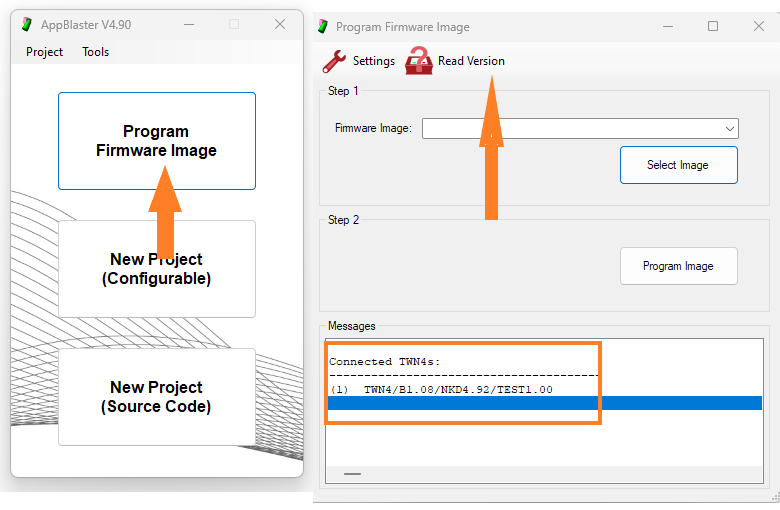
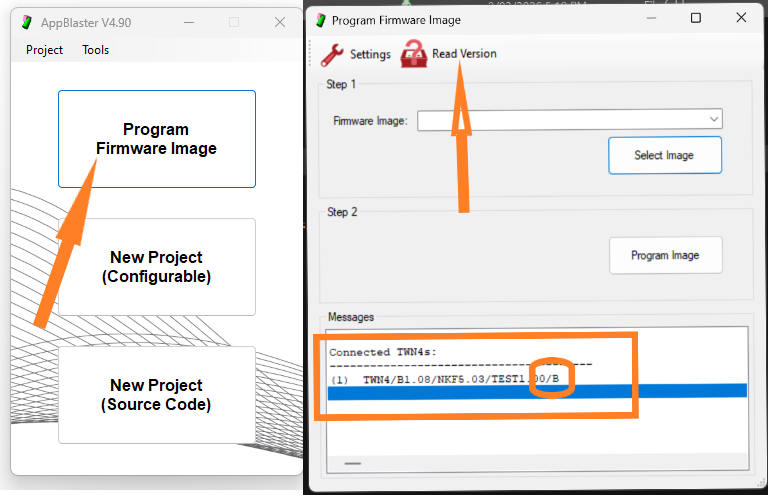
Please check the Reader Version if it does not contain the "/B" at the End of the Reader Version String, then you must use the TWN4DevPack490.zip tools
Here is an Example of a TWN4 Slim Reader missing the "/B" option at end of String using the AppBlaster.exe tool.
Please Download Older_Firmware_Pack_490
Here is what is Supplied
1. Elatec App Blaster tool called TWN4DevPack490.zip
2. The TWN4_xKx492_TEST100_Test_Project.bix is the Firmware to support Keystroke Mode which includes BLE and is used to program any of our pre-configured Project files that we supplied as part of the Zip file.
Our Pre-Configured Project files:
A) BLE & CypherCard Support
B) BLE & ISO14443A UUID (32/56)bit
C) CypherCard Only Support
D) BLE Only Support
Important!
You will need to plug your Elatec TWN4 Reader into a Windows PC, and this will require a suitable USB Cable.!
Addendum
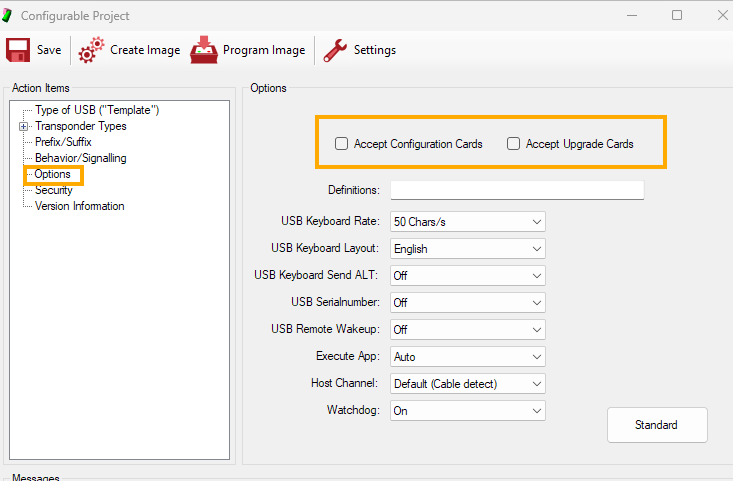
If you wish to Support Our HP Secure Authentication Mobile app in BLE mode for Elatec TWN4 Readers, then you should disable the following options.
If your Elatec TWN4 Reader is a recent, 2025 Onwards and the Reader Version Contains the Letter "/B" at the End of the Reader Version String, then you can now use DevPackV5 and above to program your Reader.
Please watch the following Video on how to manually program your Elatec reader to support BLE and or Our Biometric Enabled CypherCards.
Addendum
If you wish to Support Our HP Secure Authentication Mobile app in BLE mode for Elatec TWN4 Readers, then you should disable the following options.
Please Download ---Elatec App Blaster tool called TWN4DevPack507.zip
You may also want to Refer to the following Article
You can also use HP-Elatec-Reader-Management-v2.5.4.0.zip tools to remotely update all firmware + config settings, over TCPIP while the reader is connected to your HP Device as long as HP Authentication Manager is not Installed, else it will break HP Authentication Manager and you will need to re-install to fix it.
FAQ
How to configure Elatec TWN4 Readers
Was this article helpful?
That’s Great!
Thank you for your feedback
Sorry! We couldn't be helpful
Thank you for your feedback
Feedback sent
We appreciate your effort and will try to fix the article