When installing HP Authentication Manager Azure Services—whether from the Azure Marketplace or by using PowerShell / Bash scripts—it’s important to ensure you have the right Azure roles and access.
Below is a streamlined guide explaining exactly what permissions you’ll need.
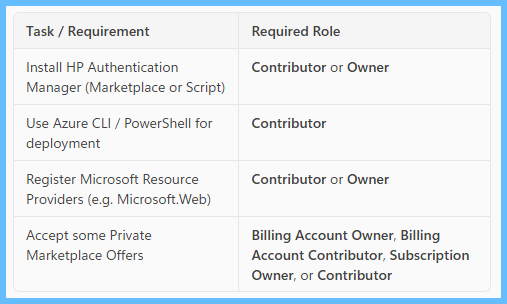
1. Azure Subscription Access Requirements
To deploy Marketplace offers (public or private) or to run deployment scripts, you must first have the appropriate access at the subscription level.
You will need:
Owner or Contributor access on the subscription
These roles grant the permissions necessary to create, update, and delete Azure resources.
The Contributor role specifically “grants full access to manage all resources” (excluding RBAC assignments)
Azure built-in roles - Azure RBAC | Microsoft Learn
2. Private Marketplace Offers — Billing-Related Roles
Some private offers require billing permissions. Depending on the offer, any one of the following may be sufficient:
Billing Account Owner
Billing Account Contributor
Subscription Owner
Contributor
These roles ensure you can view or accept private Marketplace offers depending on how the offer is configured.
3. Permissions Needed to Install HP Authentication Manager (Marketplace or Scripts)
Whether you install via:
Azure Marketplace
PowerShell scripts
Bash/Azure CLI
You will require the Contributor role so that you can:
Create resources
Update resources
Delete resources
Authenticate via Azure CLI (using `az login`)
Create SignalR Service with App Service using Azure CLI | Microsoft Learn , This role ensures full resource deployment capability.
4. Resource Provider Registrations Required During Installation
Some Azure services automatically require certain Microsoft Resource Providers to be registered on the subscription.
For example, during installation you may need providers such as:
Microsoft.Web
Microsoft.Storage
Microsoft.Monitor
Microsoft.Insights
Microsoft.SignalRService
Microsoft.ContainerInstance
Microsoft.Authorization
Azure services like SignalR and Log Analytics (Azure Monitor) rely on these providers to operate.
Important:
If your role does not allow you to register resource providers, the installation will fail.
Azure notes that Contributor and Owner roles can manage resources at the subscription level, including provider registration (Contributor can manage resources, while Owner can also assign roles).
Azure built-in roles - Azure RBAC | Microsoft Learn
5. So… Which Roles Can Register Resource Providers?
To register Azure Resource Providers (e.g., `Microsoft.Web`, `Microsoft.Portal`) you need:
Owner, or
Contributor
Both roles allow resource provider registration because they allow full resource management at the subscription scope.
Tip!
You may find that during an Install some of the resources may fail to register, feel free to manually register all of the above resources prior to an install.
FAQ
SignalR
Log Analytics
LogAnalytics
Azure Monitor
Was this article helpful?
That’s Great!
Thank you for your feedback
Sorry! We couldn't be helpful
Thank you for your feedback
Feedback sent
We appreciate your effort and will try to fix the article