MF01 - Error trying to load the Printer's features
MF02 - Attestation error - Unable to obtain HP Workpath Attestation token
This could be an issue access to the HP Eco System, check to see if any HPCC Maintenance work is underway, or you may also have Firewall Rules Blocking access. Please attempt a Retry - this normally will resolve the connection. Also Check the Printers Time and Date and if you had to Adjust the Time & or Date, then please reboot after the changes.
MF03 - Connection error, Unable to communicate to Azure outlook services
This is most likely an Azure Permission, Conditional Access Restriction, you will need to ask the customer IT Security Specialist to review sign-in access logs and Conditional access Policies under Azure / Entra.
If you are using a Conditional access policy that utilises Required approved client app and or Require app protection policy, then please watch the following video on how to overcome Errors when accessing OneDrive, SharePoint, Mailflow and teams, you may see errors like Mailflow MF03, OneDrive, Folder does not exist, SharePoint, You do not have permissions.
Please note, If you receive HP Server errors and or HP Token errors we suggest to retry the application, as this may occur the very first time HP Authentication and or any of the HP Authentication suite of apps are loaded and reboot the printer
If the reties fail, then we suggest you review the following article, as it could be related to Firewall Rules.
What ports do I need to have open for Workpath apps
Other Checks
- Please press Retry, there could be some network delay.
- Check Azure HP Authentication Manager API Permissions to ensure you have all the correct Delegated Permissions and Admin has granted Consent. These New consents are applicable for HP Authentication Manager V3.0 >, OneDrive, SharepPoint, Mailflow and Teams based On Our Hosted Backend Services (Keycloak)
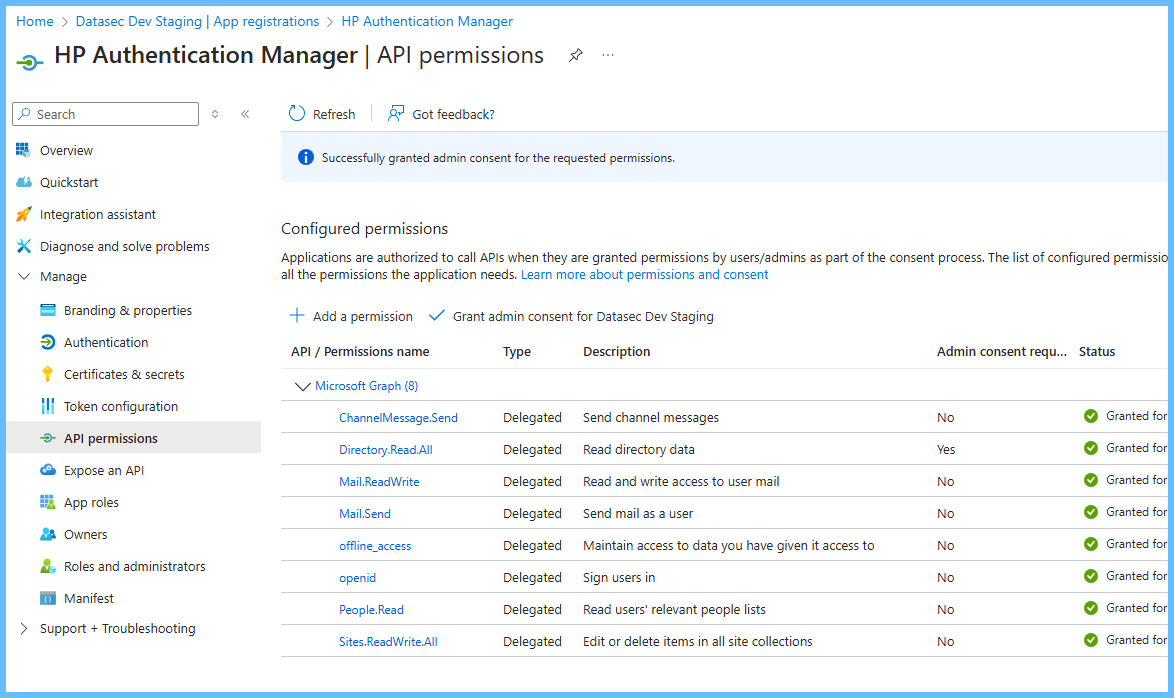
These Permissions covers customers who fully host their own SignalR and Custom Security Attributes
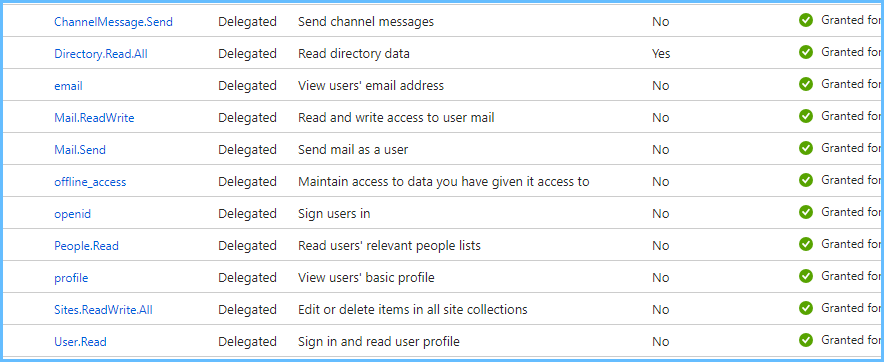
Deployment Instructions, Manuals & Technical Information Guides
Please Review the HP Workpath Security Whitepapers - Attached
Was this article helpful?
That’s Great!
Thank you for your feedback
Sorry! We couldn't be helpful
Thank you for your feedback
Feedback sent
We appreciate your effort and will try to fix the article