During a installation of Log Analytics, you may find that you did not record the report connection String URL that is used in HP Command centre to set the Configuration of HP Authentication Manager
Follow these steps to obtain the URL value from the Resource Group that was used for both SignalR and Log analytics install Process
1. Locate your Log Analytics Data Collection endpoint and make a Copy of the Log Ingestion Value
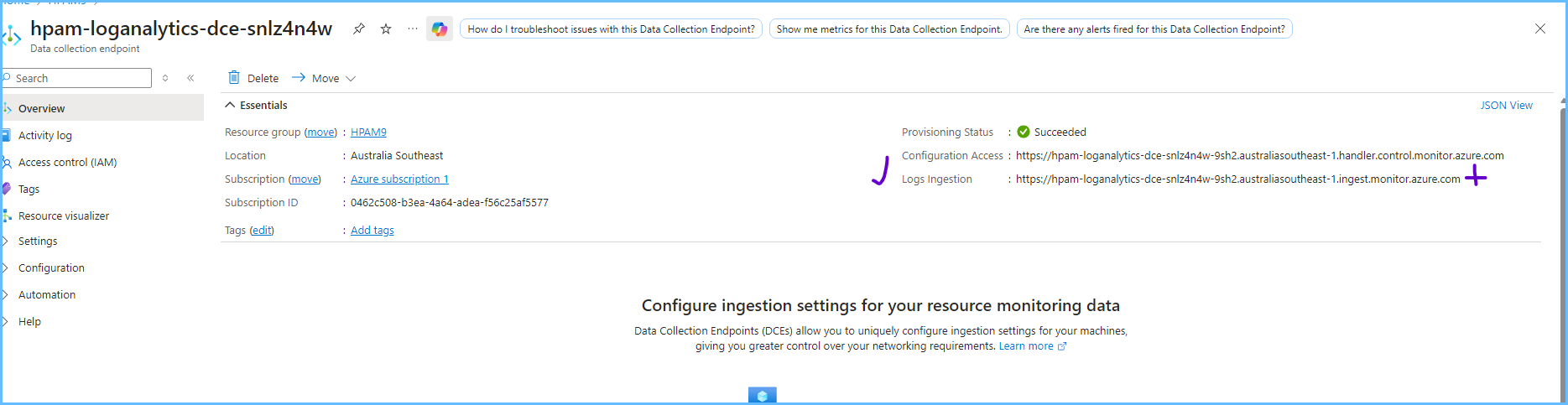
2. Next we need to obtain a copy of the Immutable ID from Data Collection rule
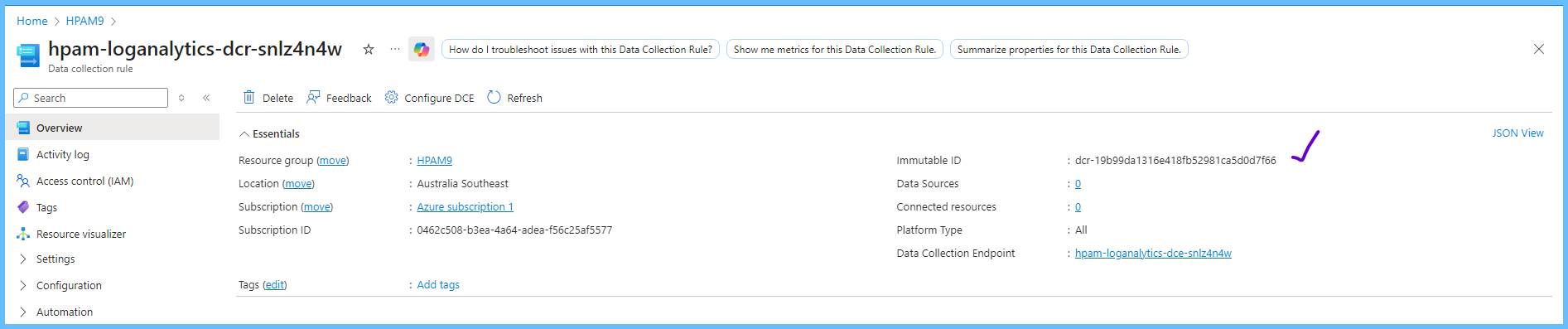
3. Next we need to add them together in the Following Order
a. Log Ingestion Value@Custom-HpamPrinterLogs@ Immutable ID
This is a Fixed Value =@Custom-HpamPrinterLogs@
So for example it should end up Like
https://hpam-loganalytics-dce-snlz4n4w-9sh2.australiasoutheast-1.ingest.monitor.azure.com@Custom-HpamPrinterLogs@dcr-19b99da1316e418fb52981ca5d0d7f66
You can now use the full String and update your HP Authentication Manager Connection Reporting String
Was this article helpful?
That’s Great!
Thank you for your feedback
Sorry! We couldn't be helpful
Thank you for your feedback
Feedback sent
We appreciate your effort and will try to fix the article